Where to Mount a Sat Nav in a Lorry UK
Mount a portable sat nav in a lorry before you move, in a low, stable place you can glance at without covering the road ahead or encouraging you to reach or tap the screen while the vehicle is moving. There is no single lawful mounting point for every cab, so the driver still has to keep a full view of the road and proper control of the vehicle.
What is the safest general place to mount a sat nav in a lorry?
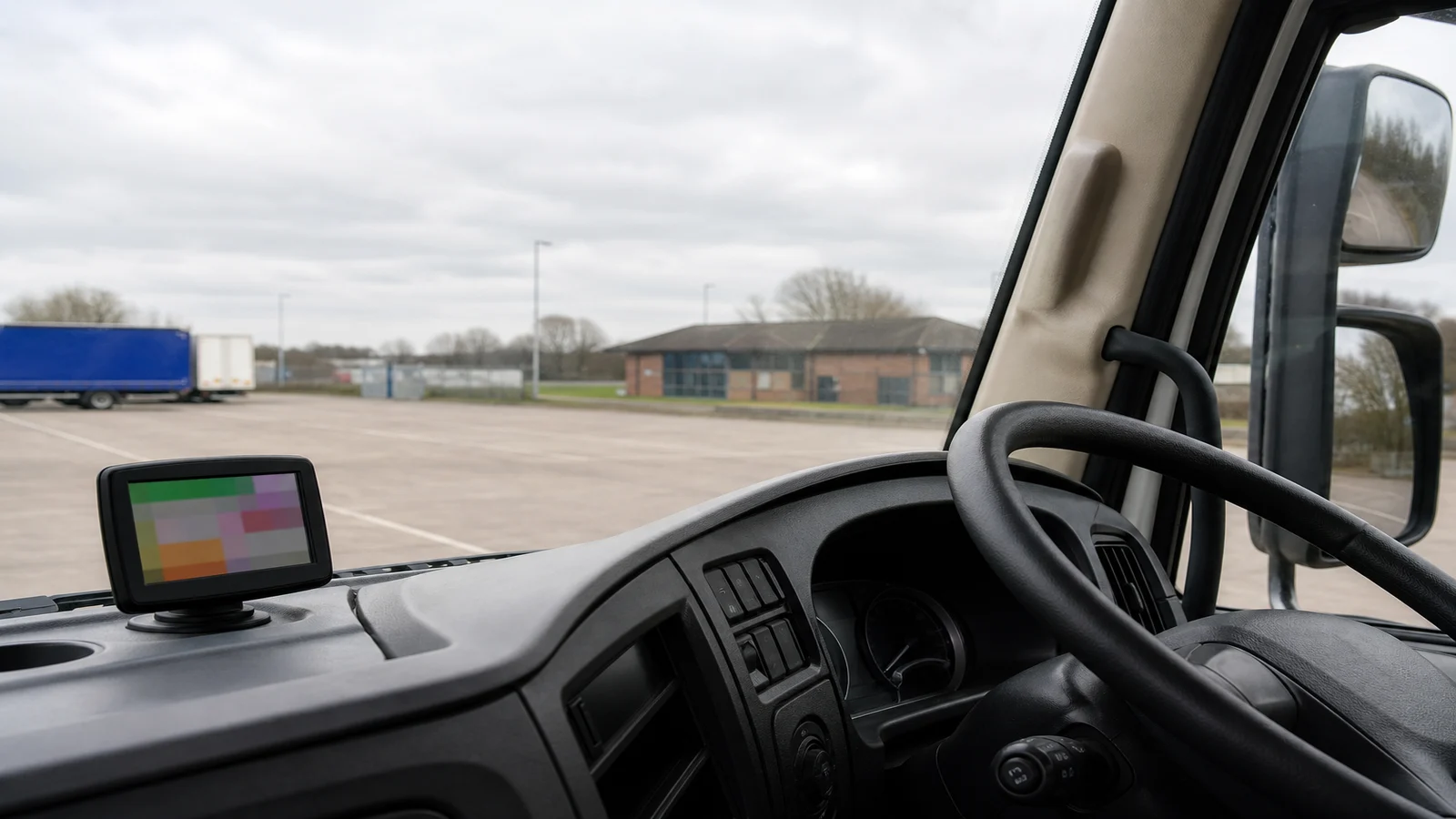
The safest general place is just off the main windscreen sightline: low on the dashboard or low on the left or right of the glass, close enough for a short glance and far enough that the unit does not sit in the centre of the view. GOV.UK guidance on using a phone, sat nav or other device when driving treats a dashboard holder, a dashboard mat, a windscreen mount or a built-in unit as hands-free options, provided you do not hold the device and it does not block your view of the road and traffic ahead.
In a high HGV cab that usually means keeping the screen below the band of glass you use to scan pedestrians, cyclists, signal heads and the road edge. Sit in the driving seat with the seat, steering wheel and mirrors already set as you will drive them. Look out as if you are about to leave the yard. If the unit, its stalk or a cable sits in that scan, the position is too high or too central.
The Highway Code section on using the road expects a check of mirrors and blind spots before moving off, and control once moving, including driving with both hands on the wheel where possible. A mount that forces a stretch across the cab, a lean toward the passenger side, or a two-handed fiddle fights that expectation even if the sucker itself looks neat.
How can I check whether the device blocks my view?
Do the check while the vehicle is parked, not while rolling out of the gate. Cab heights, screen curvature and seat travel vary enough that copying another driver's layout is a weak shortcut.
- Park legally, apply the parking brake, then set the seat, steering and mirrors as you will use them on the road.
- Look through the windscreen along the path out of the space, including the near-side kerb and the off-side approach to any junction.
- Check whether the unit, mount arm or cable covers glass you need for people in hi-vis, cycle traffic or traffic signals.
- Reach toward the unit and the power lead with your normal driving posture. If you must leave the seat back or take a hand far off the wheel to steady it, the position is poor.
- Repeat the look after dusk with dipped headlights in an unlit yard, because a bright screen can hide glass that looked clear in daylight.
Write down the cab type, the mount type and the position you accepted. Agency work, night trunks and trailer swaps make it easy to copy a previous cab's layout into a cab where it does not fit.
Is a windscreen mount always suitable?
A windscreen mount is not always suitable. GOV.UK lists it as one hands-free option, not as a default that works in every lorry. Large curved screens, rain sensors, camera housings, ticket holders, sun-visor travel and the extra height of an HGV cab can push a sucker mount into the driver's view even when the same mount looked harmless in a van.
Wet, dirty or very cold glass can let a sucker creep after the first miles of vibration. If the only remaining glass is high and central, start with a dashboard position that stays out of the sightline, provided it is stable and does not sit over a control you need. If neither glass nor dash gives a stable, unobstructed place, do not improvise with tape, a loose tray, a clipboard clip or a passenger holding the unit.
What should I do before entering or changing a route?
Enter or change the destination only when the vehicle is safely parked. Holding a sat nav, tablet or similar device while driving is illegal in the UK, including when you are stopped at traffic lights or queuing, and GOV.UK sets out penalties both for holding a device and for not having a full view of the road or proper control. Voice control does not cancel the need to keep the mount and your attention compatible with control of the vehicle.
Before you leave the yard, confirm the destination, the vehicle dimensions used in the route, and any operator instruction about restricted roads. If a later instruction arrives by phone or radio, park safely before you touch the unit. A depot, a designated parking place or a safe lay-by is the place to correct a wrong postcode; the approach to a roundabout is not.
When should I stop and choose a different mount?
Choose a different mount when the unit moves, rotates into the glass, hides a mirror, sits over a control, or would need a hand to hold it while moving. Choose a different mount when the screen is so bright or so close that you stare at it instead of the road. Choose a different mount when the cab belongs to another driver whose layout you must not alter without permission, or when a windscreen mount is the only option left and it still sits in the sightline.
Cab mounting checklist
- Park, then set seat, steering and mirrors before placing the unit.
- Keep the device off the central windscreen sightline.
- Confirm you can still see kerbs, pedestrians and signal heads around the unit.
- Confirm a short glance is possible without a stretch across the cab.
- Route the power lead so it cannot snag the wheel, stalks or pedals.
- Enter or change the route only while safely parked.
- Recheck the mount after the first few miles of vibration.
Who this article is not for
This article is not for car-only drivers choosing a phone holder, and it is not a substitute for operator cab-fit rules. It is also not for anyone looking for one mounting position that is lawful in every HGV, coach or van, or for anyone who wants a legal ruling on a particular cab.
Stop conditions
Stop if the mount blocks your view of the road. Stop if you would need to hold the device while moving. Stop if the unit covers glass you use for pedestrians or cyclists, if it sits over a control you need, or if the only way to change a route is to type while the lorry is in motion. Park, then fix the layout or ask the operator for another mount or cab instruction.
If you still need a portable unit after the cab check, you can review the 7-inch automotive navigation system. Treat the live listing and the unit's own instructions as the source for that product; this page does not certify a mount for a particular cab. For later conflicts between a planned route and a roadside sign, see how to use HGV road restriction signs in route planning.